Equipment warranty status
10 min read
Overview
Task
The company launched a one-year equipment warranty, and the first warranties were set to expire en masse in the summer and autumn of 2026. Before leaving for a job, a field engineer needs to know whether a replacement is covered by the warranty or whether they should sell the customer new equipment. The app held none of this data. The business requirement: show warranty information for the equipment and state its expiry date.
Product
A mobile app for handling service jobs
User
Field engineers — specialists who visit customers at home to connect internet and TV: running cable, setting up or replacing equipment.
How we will know the solution worked
The share of equipment-related calls to the call centre out of all support enquiries. Measured from call centre statistics, comparing the periods before and after the launch.
Today: 15% (≈3,000 of 20,000 enquiries a month).
Target: 8% (−7 pp) — the drop comes from the engineer seeing the equipment's warranty status in the app.

Despite how simple the brief sounded, things turned out to be far more interesting once I went out to the users and uncovered a few important details. That is how the user story came about.
User story
As a field engineer, I want to see the full details of a customer's equipment in advance so that I can decide how to approach the job
Result
Results
Share of equipment-related calls to the call centre: 15% → 8% target (−7 pp)
The measurement is scheduled for mid-autumn 2026, once enough jobs with mass-expired warranties have piled up.
Source: call centre statistics, comparing the periods before and after the launch.
Functional prototype
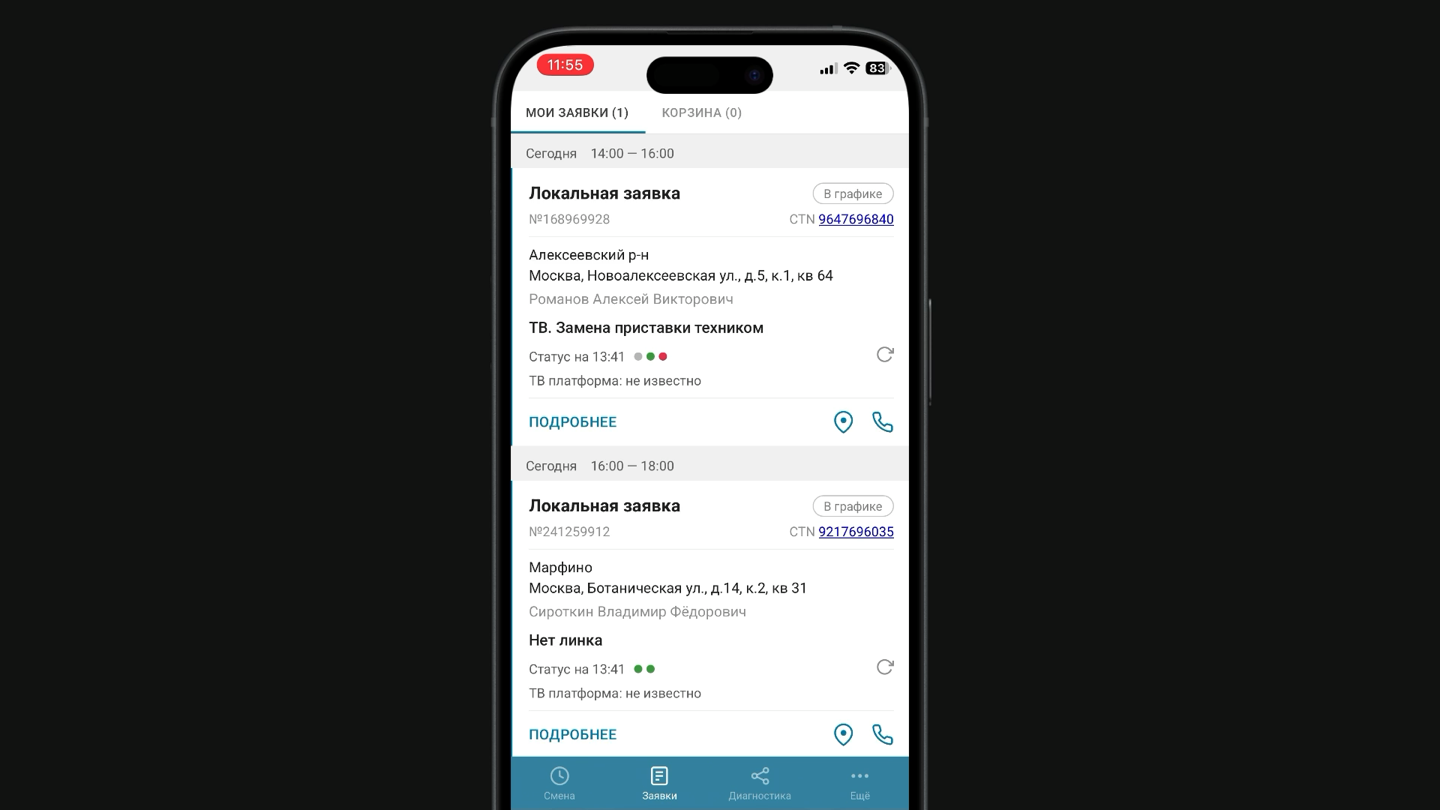
I built a working HTML prototype and tested it with field engineers — the job screen shows an equipment block that tells the user whether the replacement is covered by the warranty or whether the customer should be sold new equipment.
Screens before
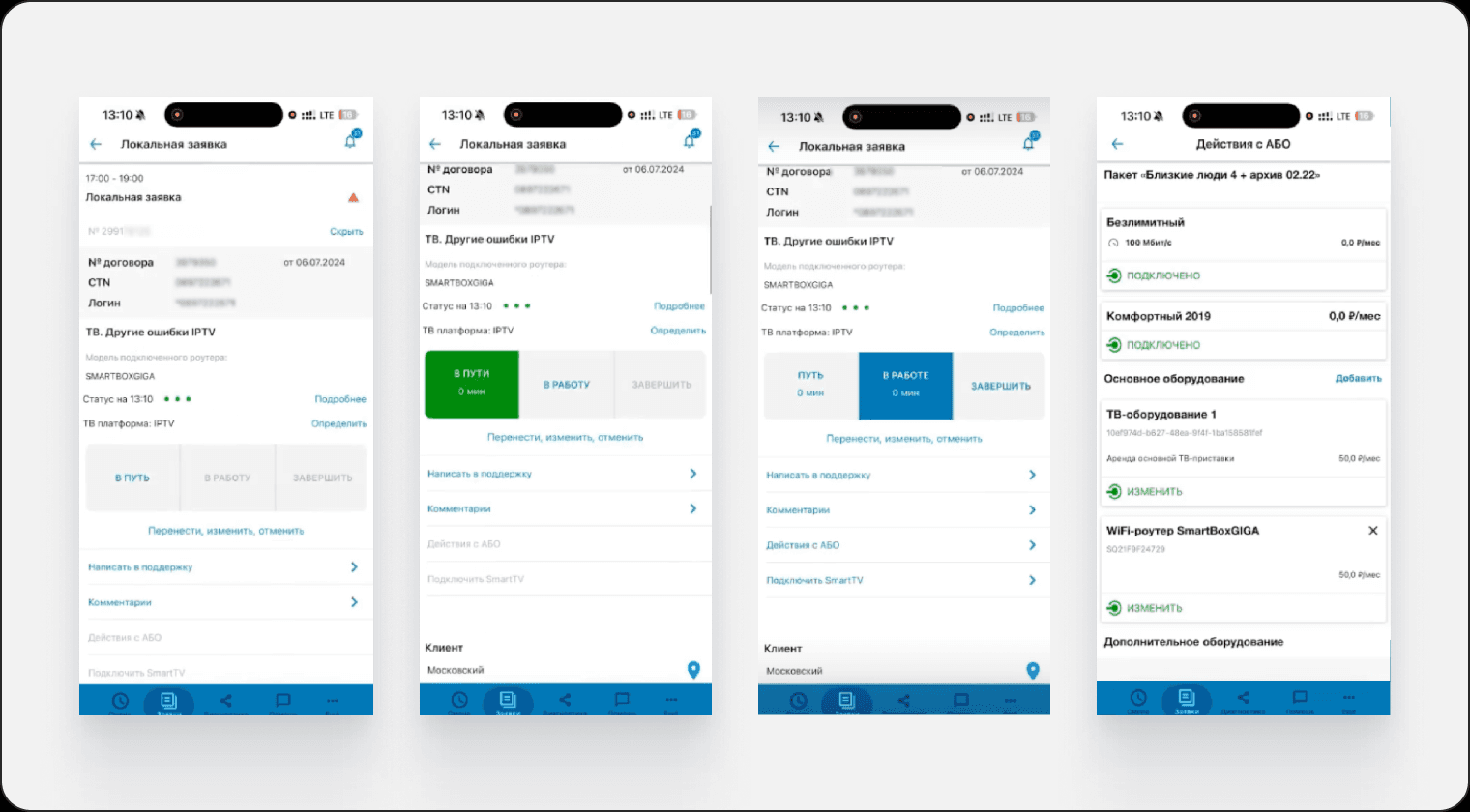
Before:
- No warranty status for the equipment — the user only found out about it by calling the support line.
- Equipment details were visible only after opening the section through a change of job status.
Screens after
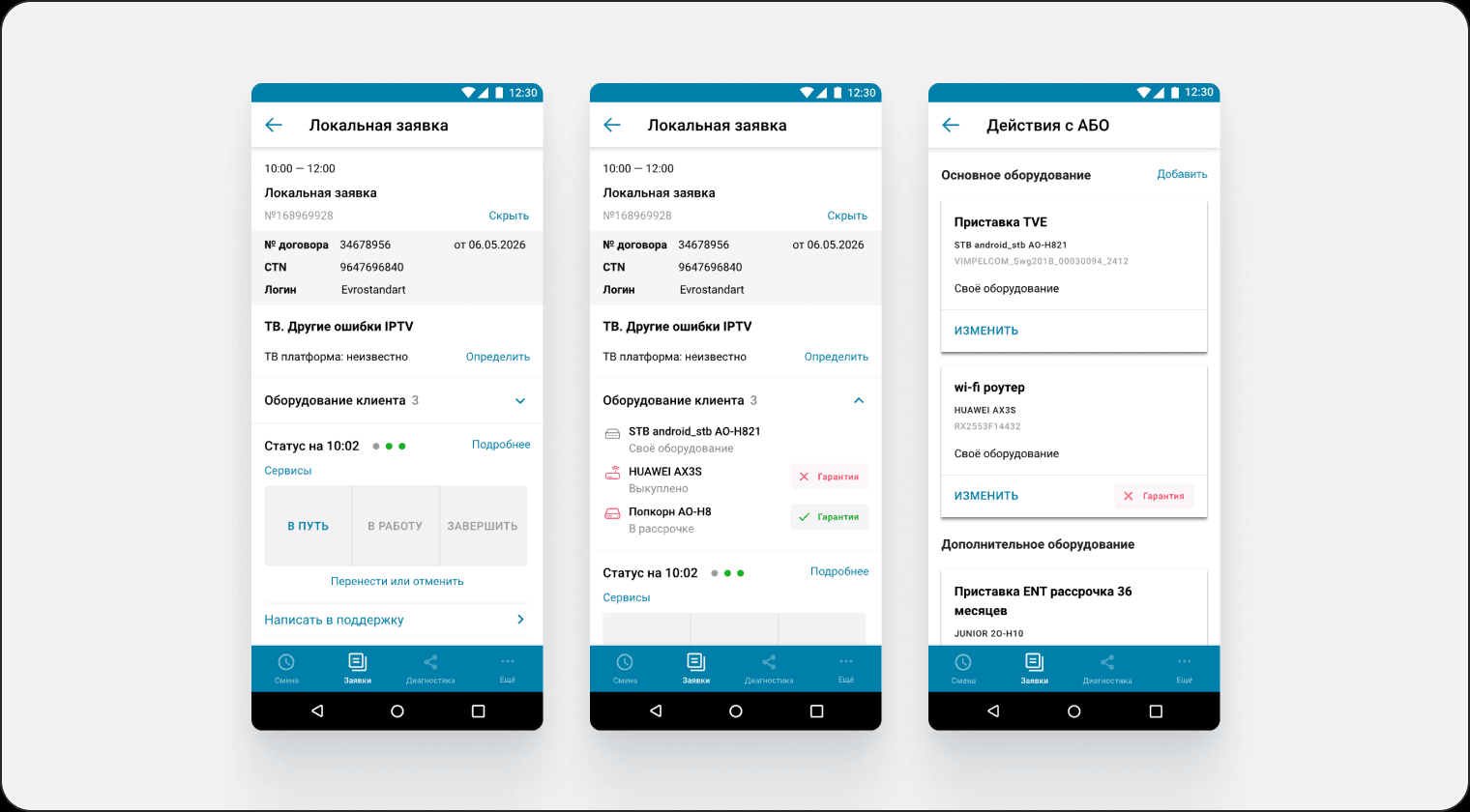
After:
Equipment data is available right on the job, and every item shows its warranty status. Information in the cards follows a single standard and is structured by hierarchy.
Problem
Business problem
- Cost of replacing equipment whose warranty has expired
- No process for replacement once the warranty has expired
- Load on the call centre
User problem
- Not enough information to decide on replacing the equipment
- Extra steps to view equipment (no way to see immediately what needs replacing)
- Risk of refusing or rescheduling a job — going back to the office for the right equipment
Process
Research
- Semi-structured problem interview
- Screen flow as is
- Heuristic analysis
- In-depth interviews
Analysis
- Hypotheses, findings, solutions
- User flow
- Entity diagram
- Site map
Design
- Working through the mockups
- Building the prototype
Presenting the work
- Presenting to the team
- Presenting to the business
Usability testing
- Writing the guide
- Report
- Improvement plan
Handover to engineering
- Presenting the work to the team and developers
Research
Before preparing for the in-depth interviews and forming hypotheses, I first ran a heuristic analysis and an expert interview with an experienced dispatcher — a former field engineer — to map the current equipment replacement scenario and get deeper into the context.
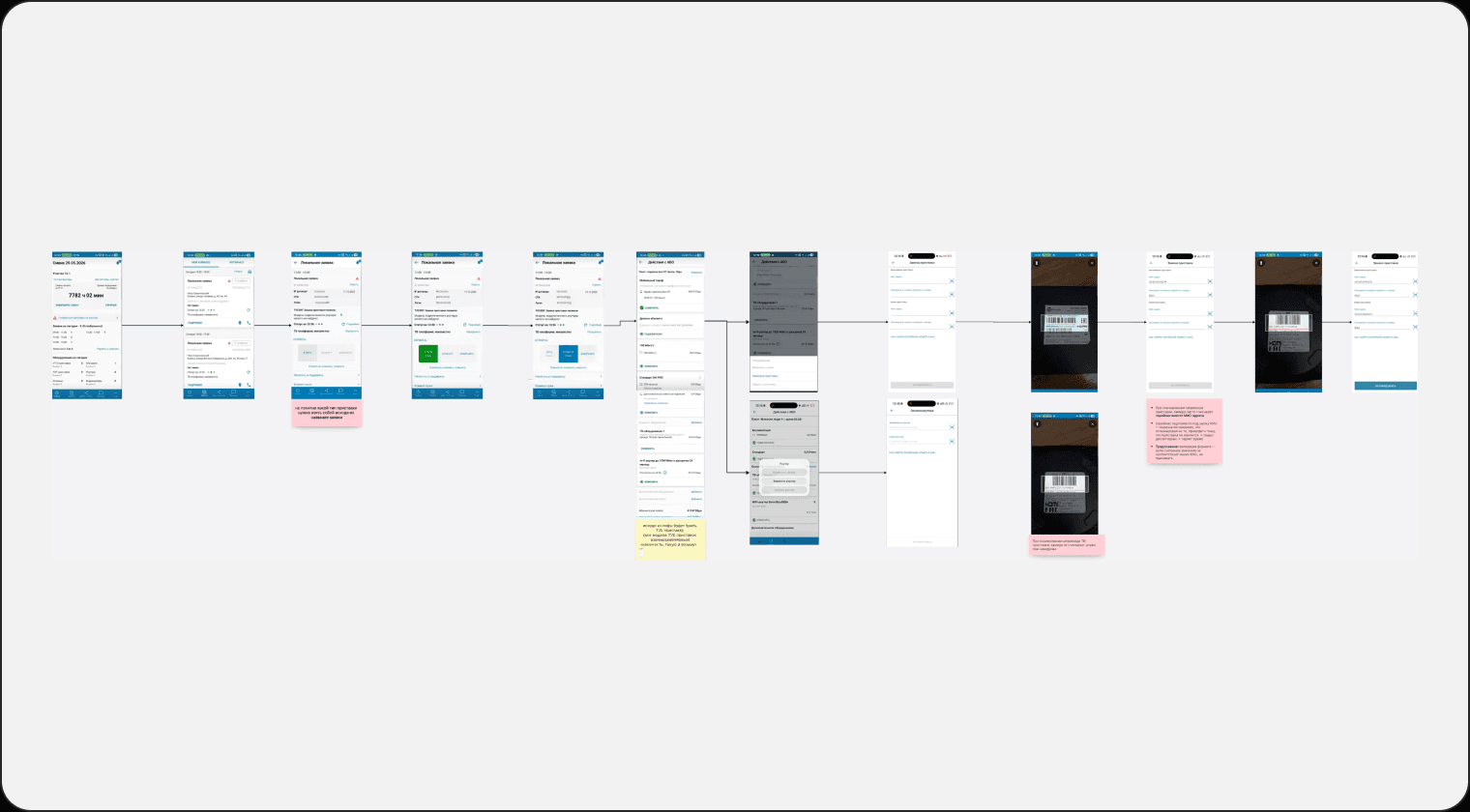
Screen flow for replacing equipment
Heuristic analysis
Goal
Run an expert review of the equipment replacement scenario and remove systemic problems in the section
Method
Jakob Nielsen's heuristic evaluation
Severity scale
- 0— not a usability problem
- 1— cosmetic problem, no need to fix unless there is spare time
- 2— minor problem, low fix priority
- 3— major problem, high fix priority
- 4— usability catastrophe, must be fixed before release
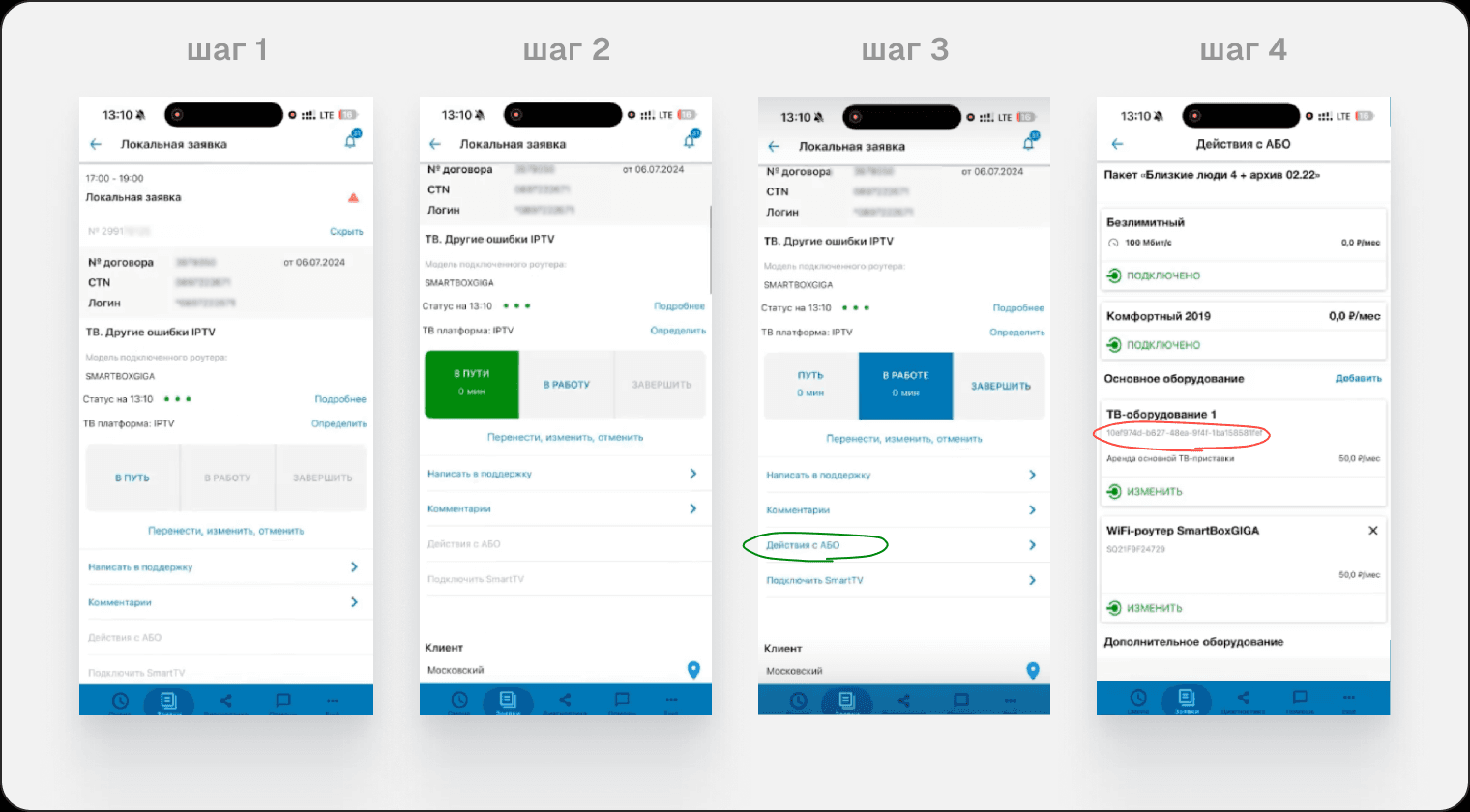
To work out which set-top box model to bring to a job, a field engineer has to fake a switch of the job status to «In progress» and reach the right section just to see the GUID that identifies the model.
Analysis results
Of the eight findings, only two fell outside the scope — quick filters in the job list and regrouping the «Subscriber actions» screen. Both sit beyond the warranty task and fixing them needed separate engineering capacity. We deferred them to the next iteration.
In-depth interviews
Goal
- Understand how users carry out an equipment replacement job
- Identify the information needs at each step (what the field engineer must know, in what order, and where they look for it today)
- Find out what problems exist in the current scenario
Sample
Who: field engineers
Count: 2 people
Split by experience
- 1 field engineer: > 6 months
- 1 field engineer: < 6 months
The sample was limited by the short timeline of the task, so I took two respondents with different levels of experience. The rest of the research I moved to usability tests, where the sample of people was wider.
Expected output
- Confirmed / disproved hypotheses
- Recommendations for improving the design
- User flow to be
Hypotheses and research questions
Map the equipment replacement scenario
- If a field engineer is preparing for a job, they want to see the type and model of the customer's equipment on the job card, because it matters that they bring the right model
- If the warehouse has no matching model, the field engineer wants to see compatible alternatives, because right now they have to work out compatibility from memory
- If a customer's warranty is about to expire, the field engineer needs to know before setting off, because it matters that they warn the customer about a paid replacement and avoid a cancelled job
The warranty feature did not exist yet, so the main motive behind the third hypothesis was to see the user's information expectations from a real scenario rather than through questions like «where would you want to see this?».
Analysis
Hypotheses, findings, solutions
Show on the job screen:
- Platform type
- Equipment count
- Model
- Ownership type
The hypothesis was confirmed, but with an insight:
The situation affected the segment of newer field engineers. However, because turnover is low and of how the network is built, each area carries a limited pool of equipment models that can be given to a customer, so a handful of models are memorised quickly. For that reason we did not take the compatible-models feature forward.
Show:
- Warranty on the job card
- Warranty in the «Subscriber actions» section
The conversations revealed that a field engineer only needs the fact: the customer's equipment is either under warranty or it is not. A countdown of remaining days changes nothing in their scenario. That conflicted with the original business requirement to show the expiry date. With this argument the requirement was revised: the solution shows only warranty status, without a countdown.
User flow to be
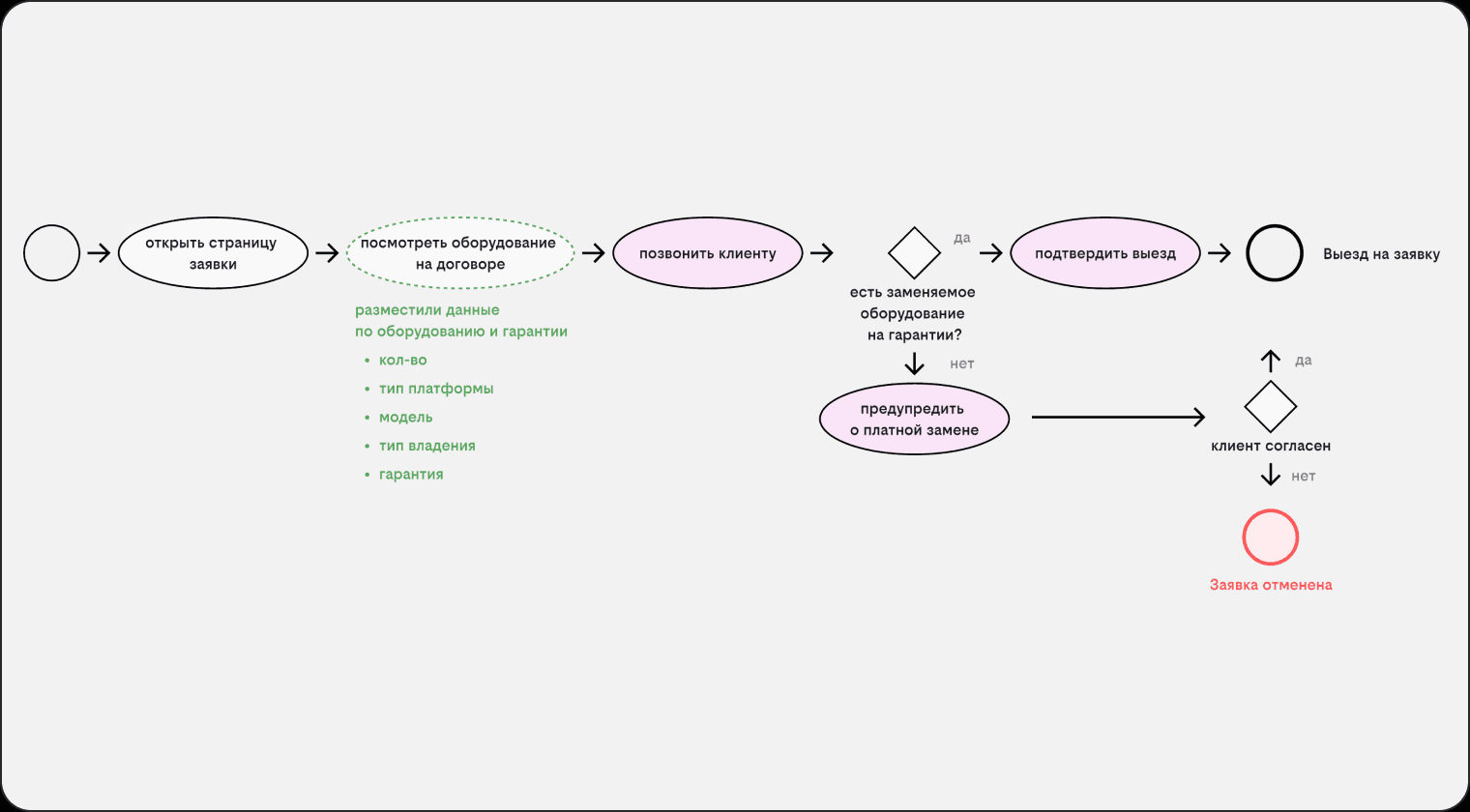
After receiving jobs, the field engineer calls customers to confirm the jobs are still valid, which avoids wasted trips. In the diagram the user sees the equipment details right on the job screen, where they can warn the customer about a possible paid replacement.
Entity diagram
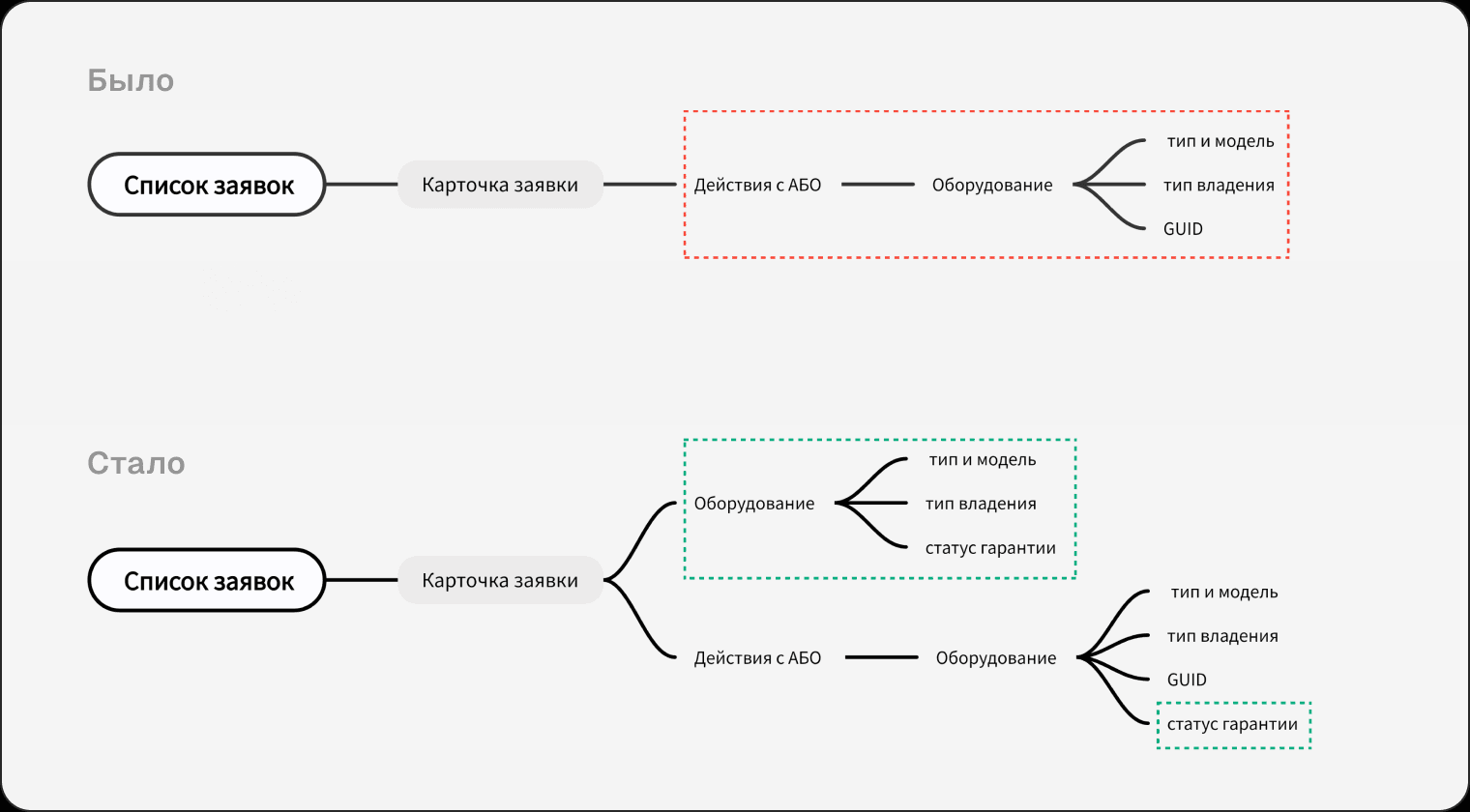
The key decision was moving equipment information one level up, where the field engineer sees equipment and warranty details without changing status and without entering «Subscriber actions». Warranty status was added in both places: on the card it supports the decision to travel, in «Subscriber actions» it supports the replacement itself.
Usability testing
Goal
- Check how effective the replacement scenario is for equipment with an expired warranty (assess ease of use)
- Find out whether the visual coding of elements (icons, colours) is clear to users
- Identify problems in the designed solution
Respondents
Who: field engineers
Count: 4 people
Split by experience
- 2 field engineers: > 6 months
- 2 field engineers: < 6 months
Task 1
Scenario: you have been assigned a job to replace a TV set-top box. Before setting off you need to work out which equipment to bring with you.
Start: the user taps START
Successful completion: the user opened the equipment list and named the model they need to bring (Popcorn AO-H8 set-top box).
As a functional prototype for the tests I built a working HTML prototype with new data, which users ran on their own phones
Hypotheses
- The user will be able to start their shift before looking for the right job
- The user will be able to find a job of type «Set-top box replacement by technician»
- The user will be able to open a job of type «Set-top box replacement by technician»
- The user will be able to find and expand the «Customer equipment» slider
- The user will be able to tell that the icon denotes the equipment type
- The user will be able to tell that the icon colour indicates the ownership type
- The user will be able to understand exactly which equipment to take with them
- The user will be able to determine the warranty status
The short version
Alongside the positive results and confirmed hypotheses, the first task produced other observations:
- Users want to see equipment details on the start screen so they do not have to open every job
- Beyond set-top boxes and routers, there is no way to identify the other equipment types that also need recognising
Solution
- Improve the equipment feature for today's view on the home screen, which currently does not display equipment information correctly
- Add more equipment icons: camera, smart speaker, Sberbox, other equipment
Task 2
Scenario: you have arrived at the customer to replace equipment. Having confirmed the equipment is faulty, you need to replace the router.
Start: the user changes the status to «On the way»
Successful completion: the user tapped the «Activate» button.
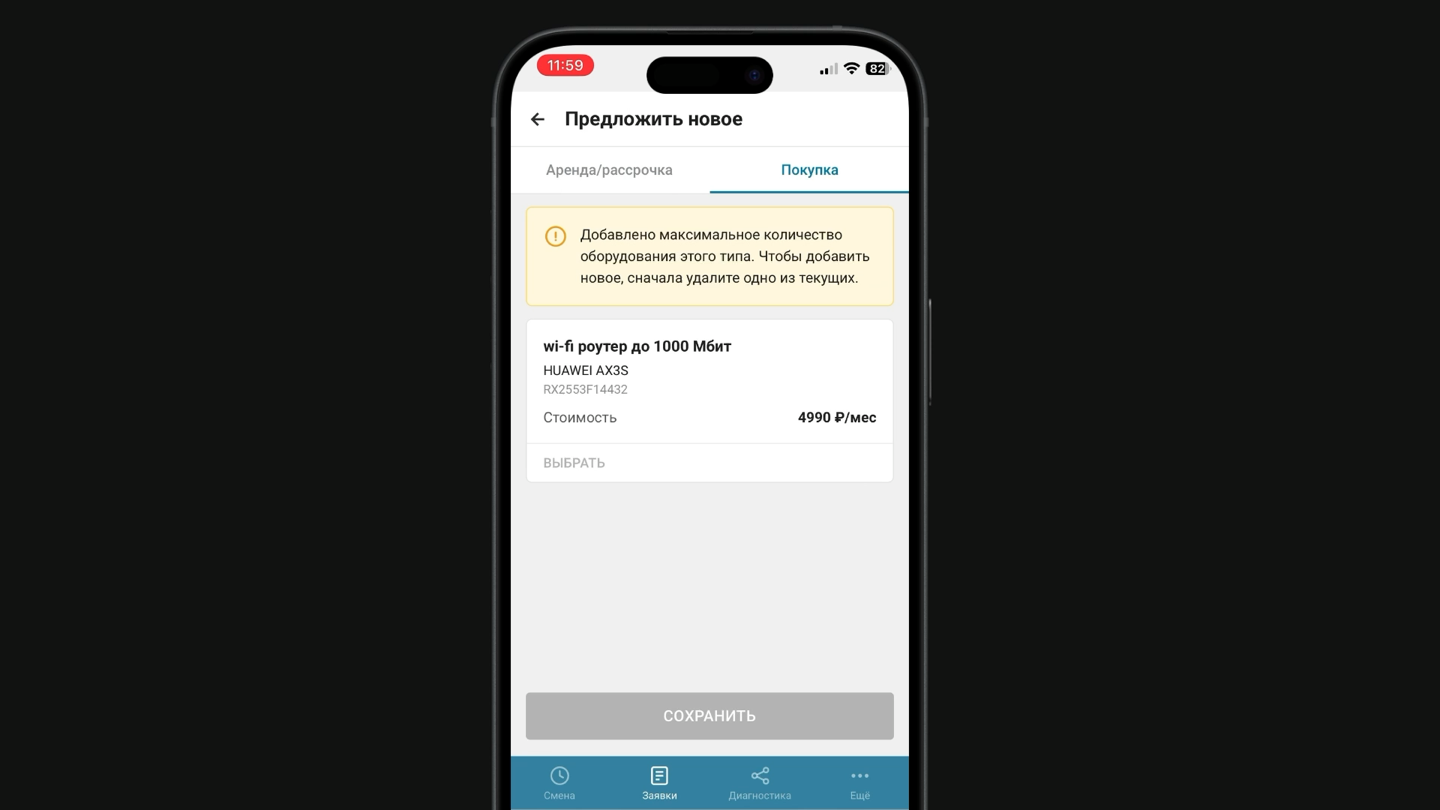
Hypotheses
- The user will be able to move the job status to in progress
- When replacing equipment, the user picks the router equipment type
- The user will be able to tell why the equipment cannot be selected
- When selecting equipment, the user taps save to apply the choice
- After registering the equipment, the user will be able to activate it
The short version
Every respondent reacted the same way: knowing the customer's equipment was faulty and seeing that the router had no warranty, they realised they could upsell equipment — but under a new job of a different type, which pays commission. So I had to nudge users to continue the scenario within the current job. That gave us a follow-on business task: equipment sales for a local job, where they would earn commission.
Users also noted they need to see the customer's balance in the equipment section in this scenario, in order to complete a sale
Solution
- Add instructions for field engineers and their managers
- Show the subscriber's balance in the equipment section
Outcome
Job screen
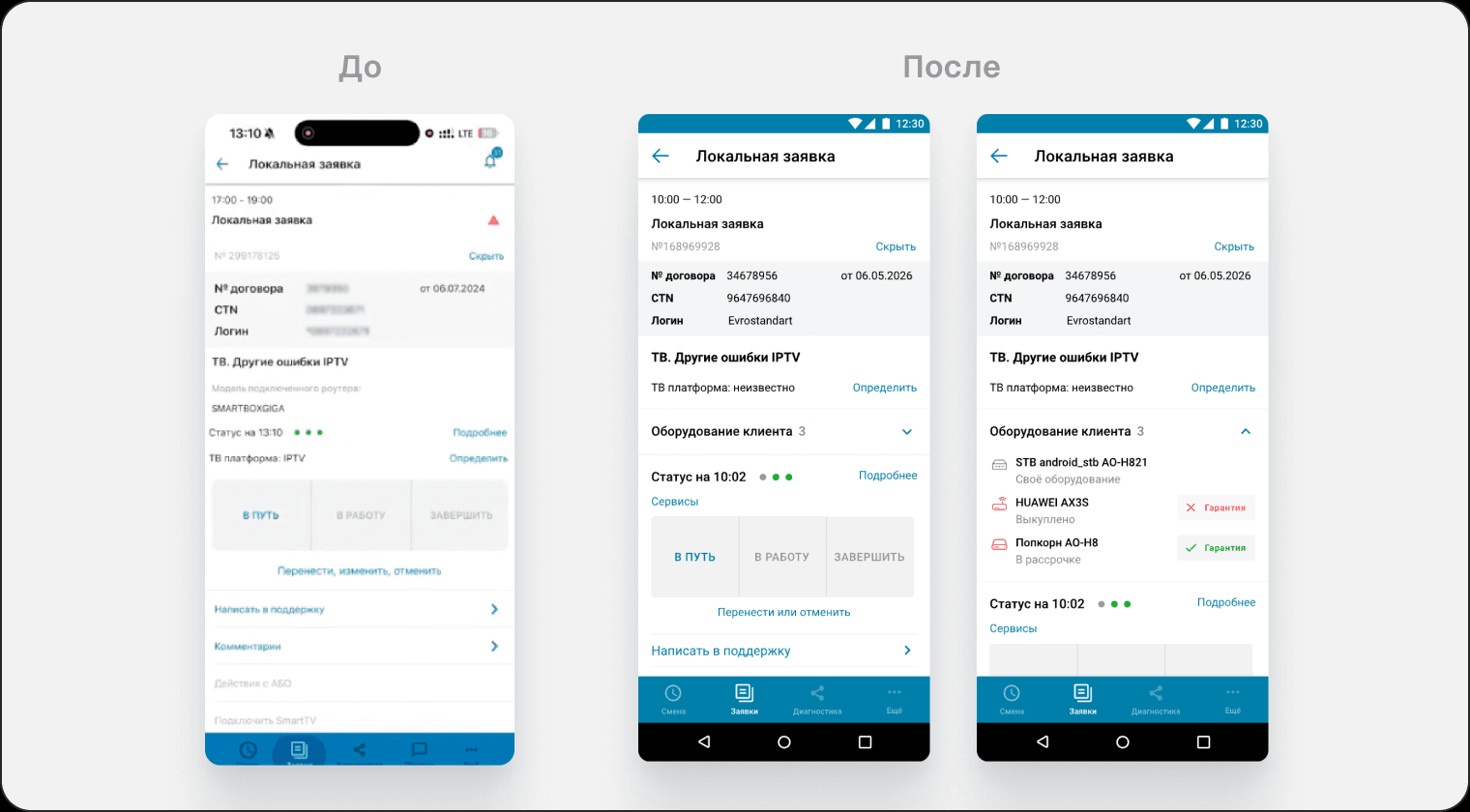
- Added a «Customer equipment» block with a count
- Added identification by equipment type icons
- Added colour coding for ownership type
- Added a warranty indicator on the equipment
Equipment section
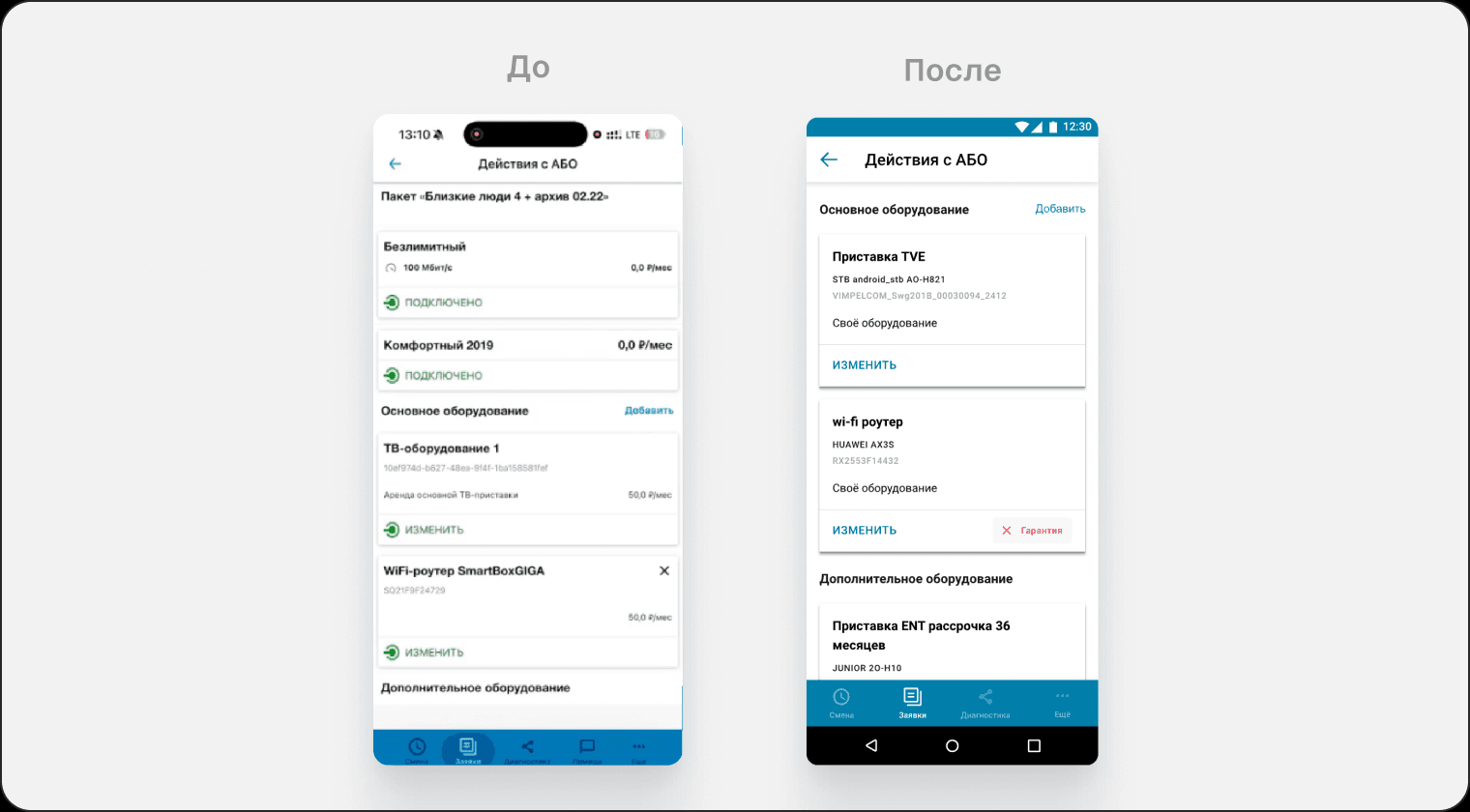
- Reordered the information on the equipment card into a clear hierarchy
- Added a warranty badge
Summary
Results
Share of equipment-related calls to the call centre: 15% → 8% target (−7 pp)
The measurement is scheduled for mid-autumn 2026, once enough jobs with mass-expired warranties have piled up.
Source: call centre statistics, comparing the periods before and after the launch.
The core problems were closed, though new tasks appeared and went into development in good time.
Challenges and lessons
The business requirement for a day counter
Challenge: the business came with a requirement to show the warranty expiry — a countdown of days remaining
Solution: the interviews revealed that a field engineer only cares about the fact — whether there is a warranty or not. The number of days changes nothing in their decision. With that argument the requirement was revised: the interface kept a status instead of a counter
What I learned: to argue design decisions by backing them with the voice of people from research
A limited sample
Challenge: field engineers work out in the field, and the deadline was set by the date warranties would expire en masse — pulling many respondents off their shifts was not possible
Solution: for the in-depth interviews I took two people with different levels of experience, and moved validation of the solution itself to usability tests, where the sample was wider
What I learned: to spread research questions across stages — whatever cannot be established reliably in an interview goes into a prototype test
A functional prototype
Challenge: the prototyping tool could not produce realistic mobile interaction
Solution: I built a functional HTML prototype with Claude Code
What I learned: how to build working prototypes in code without being a developer